
Best Apps for Contractor Leads to Grow Your Business

The best app for contractor leads may not be an app at all. It’s the platform whose lead format, billing model, and trade coverage fit your business. Lead-generation services can be worthwhile when inquiries turn into profitable booked work, but a directory listing or a stream of inquiries alone doesn’t prove value.
Contractors need more than a list of apps. The right choice depends on how prospects reach you: through a profile, a form, or a phone call. It also depends on whether your team can respond promptly and track results. The same platform may perform differently across trades, so lead fit and delivery matter as much as the interface.
This guide compares platform uses, pricing approaches, and lead types to help you assess what fits your services, sales capacity, and growth plans. You’ll also learn how to measure value beyond sign-ups and inquiry volume, and how to choose a practical next step for your lead process.
Key Takeaways
- Match each platform to the job you need it to do, such as generating inquiries, improving visibility, or connecting you with callers.
- Track leads from first contact through booked job so you can see where a platform’s value is won or lost.
- Compare subscription and pay-per-lead models by how they charge and what you receive, not by the headline price alone.
- Use free memberships to assess the time and activity they require, then weigh that effort against the visibility of paid options.
- Clarify how lead sharing, resale, and credits for invalid or out-of-area inquiries affect your competition and lead costs.
Are construction lead generation services worth it?
Lead services can be worth the cost when qualified inquiries become booked jobs at a sustainable acquisition cost. To set up an app profile, complete each business field, define your services and service area, add relevant project photos, and respond promptly to inquiries.
Choosing a Lead Platform
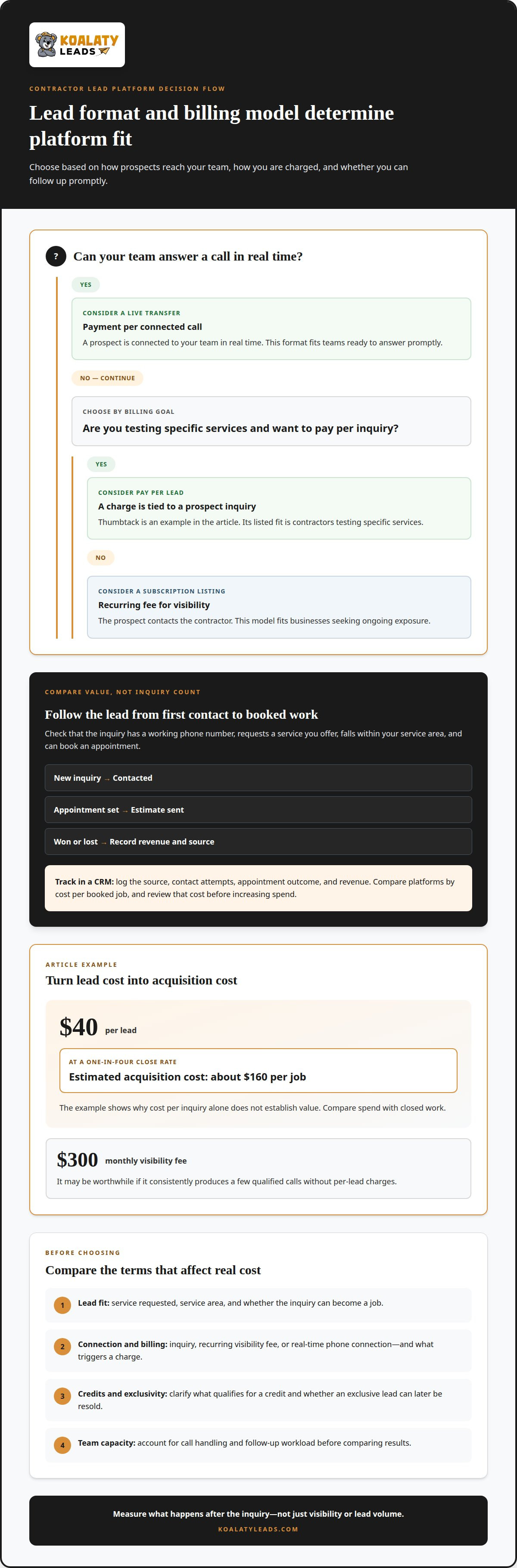
Start by matching the platform’s billing model to your sales capacity. Thumbtack uses pay-per-lead pricing, while subscription platforms charge for visibility. Compare those costs with booked jobs, not profile views. The best app for contractor leads is the one whose lead type, delivery method, and billing suit your operation.
Before building a profile, identify the work you want more of, such as roofing replacements or HVAC service calls. Describe those services clearly, set a realistic service area, and keep business details and project examples current. A complete profile gives prospects useful context before they contact you.
Use this comparison to narrow your options by how each platform charges and connects you with prospects:
| Option | Charging model | Lead connection | Best fit |
|---|---|---|---|
| Thumbtack | Pay per lead | Prospect inquiry | Contractors testing specific services |
| Subscription listing | Recurring visibility fee | Prospect contacts contractor | Businesses seeking ongoing exposure |
| Live transfer | Payment per connected call | Real-time phone connection | Teams ready to answer promptly |
Compare lead intent, contact method, billing trigger, and your team’s ability to follow up.
Lead Quality and Return on Investment
Judge lead quality by fit and outcomes, not inquiry count. Track whether each lead has a working phone number, requests a service you offer, falls within your service area, and books an appointment. These checks help distinguish useful opportunities from inquiries that can’t become jobs.
Calculate acquisition cost from actual spend and closed work. For example, at $40 per lead and a one-in-four close rate, estimated acquisition cost is about $160 per job. A $300 monthly visibility fee may be worthwhile if it consistently produces a few qualified calls without per-lead charges.
Track every inquiry in a CRM pipeline, with stages for new, contacted, appointment set, estimate sent, and won or lost. Log the source, contact attempts, appointment outcome, and revenue so you can compare platforms by cost per booked job. Without a follow-up record, a productive channel can look ineffective.
Real-time connections need a clear handoff: assign a salesperson, capture the caller’s project details, and record the next action. For a Thumbtack inquiry, log the charge and outcome alongside the lead. Review cost per booked job before increasing spend to see whether the platform’s pace and lead type suit your team.
Contractor lead-generation platforms and their use cases
U.S. contractor platforms differ in trade coverage, lead delivery, and billing triggers. Compare each opportunity with the work your team wants and can take on.
Platforms for Specific Contractor Trades
No single app fits every trade. Roofing, plumbing, HVAC, and remodeling contractors can compare broad platforms such as Thumbtack and HomeAdvisor, then review category availability in their service areas. A platform that brings plumbing inquiries may not suit a remodeling team seeking larger projects, so assess each trade separately.
Location affects what contractors can access. Lead availability and app performance vary across the United States, as platforms serve different markets and contractor demand varies by area. Review the types of inquiries available for your services, their fit, and your team’s response capacity before choosing a platform.
Paid leads can have issues such as an incorrect phone number, an out-of-area request, or work outside your trade. Before enrolling, understand what qualifies for a credit and whether separate charges or billing triggers apply. Clarify how the platform defines an exclusive lead and whether it can later be resold.
Lead Costs and Service Comparisons
Lead costs depend on the provider’s model and the work requested. Compare services by cost per booked job, not just cost per inquiry. A low-priced inquiry may deliver little value if prospects don’t answer, while a real-time call connection requires staff ready to respond. Track each format separately.
Compare lead type, delivery method, billing trigger, credit terms, and reporting tools. A marketplace may send contact details for follow-up, while a live transfer connects your team with a caller. Each format requires different sales coverage and follow-up.
| Platform type | Example | Delivery | Key comparison |
|---|---|---|---|
| Contractor marketplace | Thumbtack | Prospect inquiry | Lead charge and trade fit |
| Home-service platform | HomeAdvisor | Platform-generated inquiry | Local availability and billing terms |
| Trade-focused lead service | Service-specific provider | Web inquiry or call | Lead fit and follow-up workload |
| Live-transfer service | Phone connection | Real-time call | Call-handling capacity |
Build a scorecard for each U.S. service area. Log leads, valid contacts, appointments, and booked jobs by platform. This helps distinguish limited local availability from slow follow-up or a mismatch between inquiries and your trade. Evaluate one service category at a time, then compare results before expanding spend.
For roofing, plumbing, HVAC, and remodeling, the best choice depends on local lead supply and your team’s capacity. Use the same tracking stages for each platform, including contact attempts and appointment results. Compare cost per booked job and lead fit to decide which source merits continued investment.
Subscription pricing versus pay-per-lead models
Subscription plans charge for ongoing visibility or access, while pay-per-lead plans bill for individual inquiries. The better fit depends on your budget, your team’s follow-up process, and what the platform treats as billable.
With a subscription, the fee is tied to the plan rather than each inquiry. That can make budgeting more predictable, but it doesn’t guarantee qualified prospects or booked jobs. Compare the recurring commitment with actual appointments and completed work attributed to the platform.
Pay-per-lead billing ties charges to the inquiries you receive, so spending can rise with lead volume. Review what triggers a charge, how repeat inquiries are handled, and whether an incorrect phone number or out-of-area request can qualify for a credit. Those terms affect your effective acquisition cost.
Platform pricing can also depend on category, market, and placement choices. Identify whether you’re paying for profile visibility, an individual inquiry, a call connection, or competitive placement. A bid-to-appear model, for example, may charge for visibility without guaranteeing a specific number of qualified leads.
| Model | Billing basis | Potential advantage | Key trade-off |
|---|---|---|---|
| Subscription | Recurring plan fee | More predictable budgeting | Payment continues without a fixed job outcome |
| Pay per lead | Individual inquiry | Spend follows lead volume | Charges can apply before a job is won |
| Commission | Share of completed job value | Less upfront payment for unqualified leads | Reduces revenue from each covered job |
| Bid-to-appear | Competitive placement activity | Can target category visibility | Placement and lead costs may differ |
A commission model shifts payment toward completed work. For example, a contractor may pay 10%-20% on a $500 job to avoid upfront payment for unqualified leads. Compare that share with the cost and terms of subscription or lead-based options.
Shared distribution changes the competitive context of pay-per-lead models. An inquiry may go to several contractors, making follow-up more demanding. Clarify how many businesses receive the lead and whether one described as exclusive can later be resold.
Compare models by tracking billed inquiries, valid contacts, appointments, and jobs won in your CRM. Divide total platform costs by booked jobs, then account for recurring fees, credits, commissions, and placement charges. This gives you a clearer comparison than a single lead price.
Before committing, read the renewal, cancellation, minimum-spend, and credit terms. A subscription may suit a business seeking ongoing visibility; pay-per-lead may suit a team that prefers charges tied to incoming inquiries. Choose the billing trigger that aligns with your sales process and capacity.
Free tiers and paid memberships
A free listing can establish your company profile, while paid membership features may offer more ways to present your work. Assess the practical tools in each account, such as service categories, project photos, profile analytics, and team access. These details affect how clearly prospects understand your business before reaching out.
Build the free profile carefully before considering additional features. Use precise service descriptions, current contact information, and project examples that reflect the work you want. For instance, a remodeling contractor can list kitchen and bathroom work separately instead of using one broad description. Clear organization helps prospects find the right service and gives your team a better starting point for follow-up.
Use this sequence to assess profile tools and manage incoming activity:
- Complete each available profile field with accurate business and service details.
- Add relevant project examples and keep them aligned with the work you want to sell.
- Assign a team member to monitor inquiries and update the profile when services change.
- Review account analytics and CRM records together to understand prospect activity.
This approach tests whether your profile communicates your business effectively before you add more platform tools. Review which service pages prospects view, where inquiries originate, and whether the profile leads to relevant conversations. Keep service categories distinct so one line of work doesn’t obscure another’s performance.
| Account element | What to review | Useful for | Operational consideration |
|---|---|---|---|
| Business profile | Services, contact details, and description | Presenting core capabilities | Keep information current |
| Project examples | Relevance to target work | Showing completed project types | Use examples your team can discuss |
| Analytics | Profile activity and inquiry sources | Understanding prospect interest | Interpret alongside CRM outcomes |
| Team access | Roles and inquiry ownership | Coordinating sales follow-up | Assign clear responsibility |
Paid membership tools can help when they address a specific operating need. A sales manager might value shared account access for assigning inquiries, while a smaller contractor may prioritize analytics showing which services attract attention. Match each feature to a business task rather than treating additional tools as growth in themselves.
Connect profile activity with sales results. Tag platform inquiries by service, record the next action in your CRM, and review unanswered conversations with the person responsible. This helps you spot process issues, such as requests left unassigned or project examples attracting inquiries outside your team’s focus.
Revisit the profile when your service mix or capacity changes. Remove outdated descriptions, update examples, and confirm that inquiry ownership remains clear. Regular maintenance helps free and paid account features support a consistent prospect experience instead of creating another disconnected marketing channel.
Shared versus exclusive leads
Shared and exclusive leads differ in who receives an opportunity and how your team competes for attention. Shared leads can be sold to four to five contractors, while an exclusive lead is delivered to one contractor. Neither label alone tells you whether an inquiry fits your work or can become a job.
With a shared lead, several businesses may contact the same prospect after one request. This can suit a contractor with a fast, organized follow-up process, but your sales team may need to stand out while other contractors pursue the same project. Track whether competition affects contact and appointment outcomes.
Exclusive distribution gives one contractor the initial opportunity to respond without other recipients pursuing that same lead. For example, a contractor considering roofing leads can assess whether the inquiry matches the company’s work and service area before deciding how to follow up. Exclusivity does not guarantee that the prospect will answer or book.
Read the definition carefully. Ask whether “exclusive” means one recipient at delivery and whether the lead can later be resold or reassigned. Clarify what information accompanies the inquiry, how its service request is identified, and what happens if its phone number is incorrect or it falls outside your service area.
Lead type matters as well as distribution. A web inquiry gives your team contact information to follow up on, while a live inbound call connects the prospect by phone. These formats require different handoffs, so record them separately in your CRM and assign clear ownership for the next step.
Compare outcomes using the same measures for each lead type: valid contact, appointment, estimate, and booked job. Include follow-up effort in your assessment. A shared inquiry may take more attempts to reach, while an exclusive lead can still be a poor fit if the requested work doesn’t match your services.
For a remodeling business, tracking bathroom remodel leads separately from other project inquiries can show whether lead distribution affects results for a specific service. Keep the team, response process, and tracking stages consistent when comparing sources. That makes the results more useful than comparing lead labels alone.
Use your sales records to decide which distribution model fits your capacity and project mix. If you’re exploring lead options across trades, the contractor lead services overview can help frame that discussion.
Koalaty Leads
Koalaty Leads helps contractors pursue more direct opportunities through exclusive home improvement leads and live call transfers. It can suit businesses seeking exclusive web leads or live inbound call transfers for direct contact with prospective customers.
Lead programs are available for Roofing, Windows, Bathroom Remodeling, and Kitchen Remodeling. The right option depends on your trade, lead fit, follow-up process, and capacity to handle new inquiries. Compare each opportunity by how it reaches your team and how it performs through your sales pipeline.
If you’re weighing lead sources and want to explore options for your business, contact Koalaty Leads to discuss your trade and lead needs.
Build a Lead System That Fits Your Next Stage
Base your next growth decision on the work you want to win and how your team sells. The best app for contractor leads is the source that fits your trade, supports timely follow-up, and lets you connect lead activity with booked work. Set a clear goal for your next channel, then use your CRM to see whether inquiries advance through your sales process.
Koalaty Leads offers Roofing, Windows, and Bathroom Remodeling leads for contractors focused on those project types. Choose an option that aligns with your team’s capacity and the jobs you want to pursue, then build a consistent process for responding to inquiries and tracking outcomes.
Take the next step with a focused plan. Better lead decisions start with knowing what work you want and how your team will follow through.
Frequently Asked Questions
How do I find construction leads?
Find construction leads through platforms that let you define your trade, services, and service area. Complete your contractor profile with accurate business details and project examples, then route each inquiry to a salesperson. For example, a roofing company can separate replacement requests from other work in its lead tracking system. Review inquiries by source and service type to identify opportunities that fit your crews and sales process.
Quick answer: What are the best lead generation websites for contractors?
There isn’t one best website for every contractor; the right choice depends on trade, location, and lead format. Thumbtack, HomeAdvisor, and specialized lead generation networks are platforms contractors can compare. The best app for contractor leads should connect the prospects you want with a sales process your team can manage consistently. Check category availability, then judge results by booked work rather than profile activity alone.
What are the best apps for contractor leads in 2026?
In 2026, compare contractor platforms by the work they cover and how they deliver inquiries. Thumbtack and HomeAdvisor offer ways for contractors to receive prospect inquiries, while a lead service may provide exclusive web leads or live inbound call transfers. These options aren’t identical, and “best” depends on whether your team handles calls, follows up on forms, or needs opportunities for a specific remodeling trade.
How much do contractor lead-generation apps cost, including subscriptions and per-lead fees?
Costs depend on each platform’s billing model and terms. A subscription charges for membership or visibility, while pay-per-lead billing charges for individual inquiries; call-based services charge according to their stated connection model. Before committing, identify what triggers a charge, what counts as an invalid inquiry, and whether renewal or placement fees apply. Compare total platform spending with booked jobs, not just the advertised price or inquiry count.
Which contractor lead apps offer exclusive leads versus shared leads?
Lead distribution varies by provider and program, so a platform name alone doesn’t establish exclusivity. Some marketplace inquiries may be shared among contractors; clarify the number of recipients and whether resale is possible. Koalaty Leads provides exclusive web leads and live inbound call transfers, not shared leads. Distinguish a lead delivered to one contractor from one that is exclusive only during an initial delivery window.
What do contractors say about lead quality, conversion rates, and customer reviews on each app?
Contractor feedback varies by trade, location, and sales process, so an app’s review score can’t predict your close rate. Look for specific details in reviews: whether inquiries matched the requested service, whether contact information worked, and how support handled billing questions. Separate contractor reviews from homeowner reviews, since they describe different experiences. Compare those comments with your CRM records for contacted leads, appointments, and jobs won.
How can contractors evaluate and choose a lead-generation app for their service area and budget?
Start by listing the services you want to sell, the areas your crews can cover, and the inquiry volume your team can handle. Compare platforms available for those services, then map each plan’s charges and credit terms against your spending limit. Tag the source in your CRM and record lead outcomes. Set a review period to compare booked jobs and sales workload before expanding, changing, or ending a platform test.
Need exclusive leads instead of shared ones? Koalaty Leads delivers qualified homeowners — web leads or live call transfers — to one contractor only.
Get Started